
Compliance
VibeFlow provides built-in compliance tracking for regulated industries. Tag work items with compliance frameworks, track findings from security reviews, and generate audit-ready reports.
Supported Frameworks
| Framework | Description |
|---|---|
| HIPAA | Health Insurance Portability and Accountability Act |
| PCI-DSS | Payment Card Industry Data Security Standard |
| SOC 2 | Service Organization Control Type 2 |
| ISO 27001 | Information Security Management System |
| GDPR | General Data Protection Regulation |
| CMMC | Cybersecurity Maturity Model Certification |
| FedRAMP | Federal Risk and Authorization Management Program |
Compliance Tagging
Tag any work item (todo, issue, or finding) with one or more compliance frameworks:
Adding Tags
- Open a work item
- Click + Compliance Tag
- Select the framework (e.g., HIPAA)
- Add the section reference (e.g., "§164.312")
- Add a description (e.g., "Access control implementation")
Tag Deduplication
Tags are deduplicated by (framework, section_reference) per entity — you can't tag the same section twice on the same item.
Compliance Findings
Findings are created during security review when vulnerabilities are identified:
Finding Properties
| Property | Description |
|---|---|
| Finding Type | Category (sql_injection, xss, auth_bypass, etc.) |
| Severity | critical, high, medium, low, informational |
| Status | open, in_progress, resolved, accepted_risk |
| Source Item | The work item where the issue was found |
| Addressed By | The remediation work item (linked issue/todo) |
| Backward Compatible | Whether the fix is backward compatible |
Finding Lifecycle
- Created (
open) — Security lead identifies a vulnerability - In Progress (
in_progress) — Remediation work underway - Resolved (
resolved) — Fix implemented, commit recorded - Accepted Risk (
accepted_risk) — Risk acknowledged, not fixed
Auto-Resolution
When a remediation issue linked via create_security_review_link is completed:
- The source item's
security_reviewedflag is automatically set totrue - The finding status can be updated to
resolvedwith the resolution commit
Compliance Dashboard
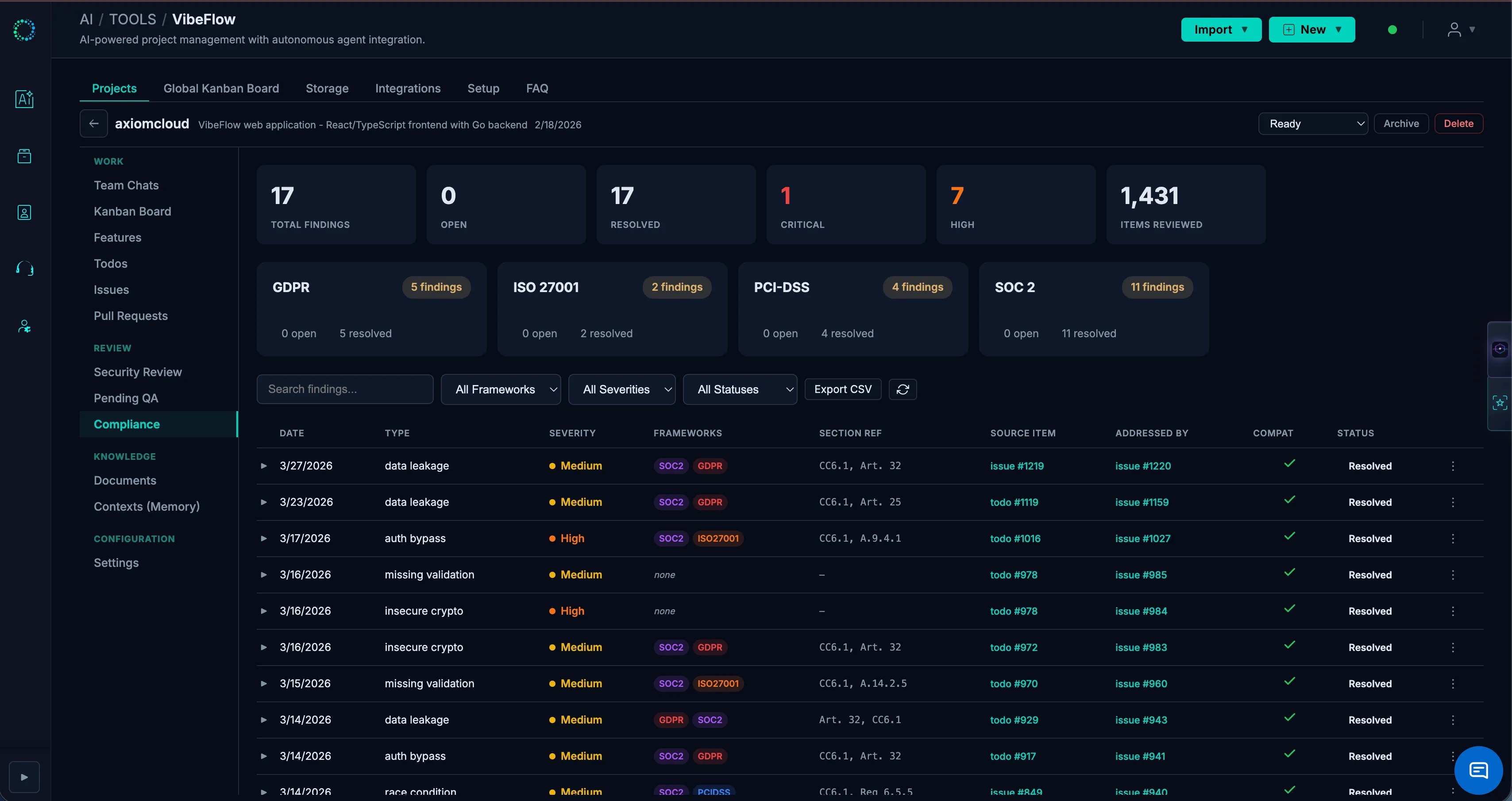
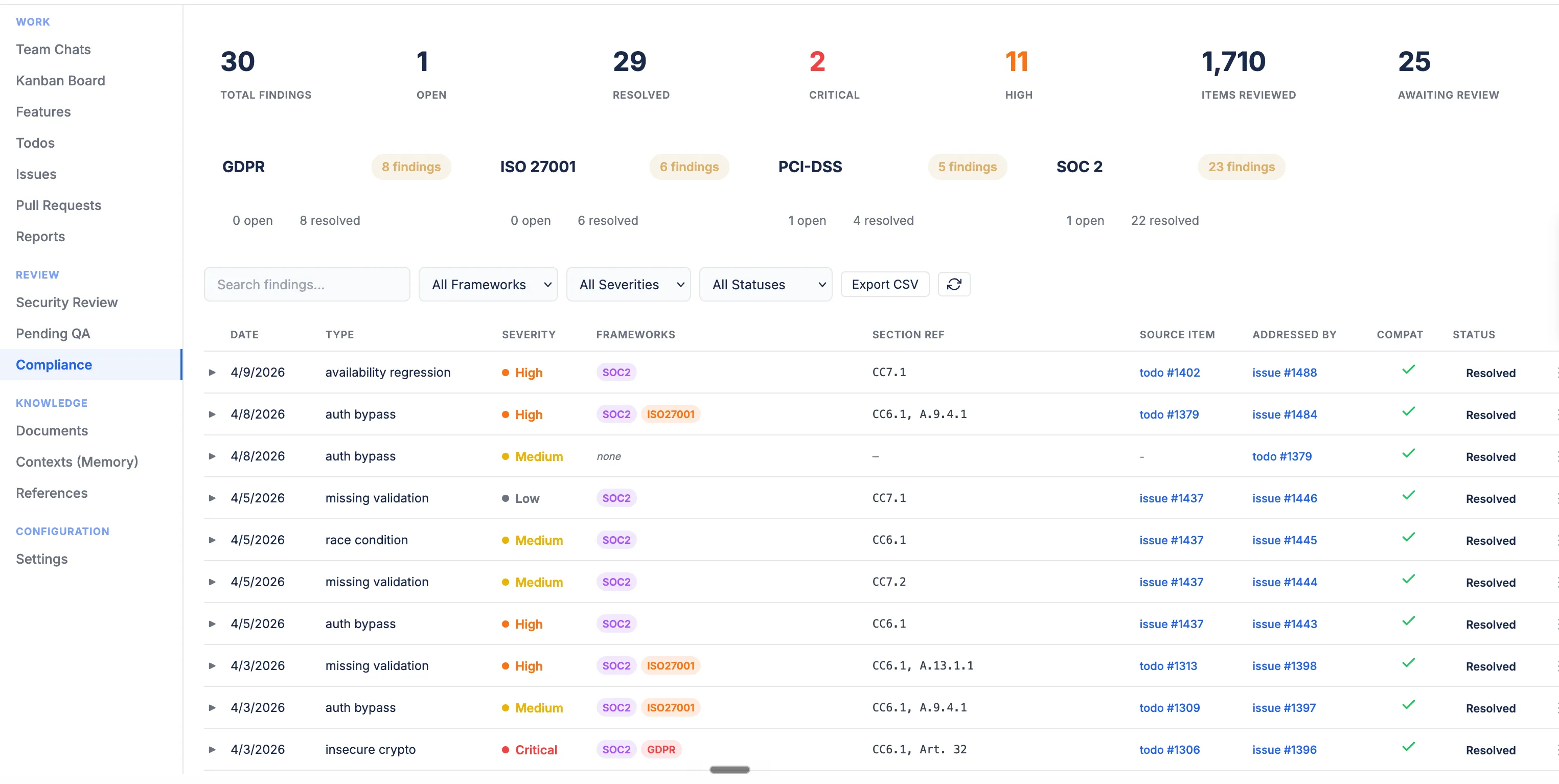
The Compliance tab provides:
- Summary view — Findings grouped by framework with resolved/open counts
- Findings list — All findings with filtering by framework, severity, and status
- Source Item and Addressed By columns — Trace findings back to origin and remediation
- Section Reference column — Quick reference to specific compliance sections
Worked Example — SOC 2 CC6.1 on a Session-Ownership Hardening
This is the actual flow we recommend, illustrated with a recent change:
- Originating issue ships: A code-modifying issue (e.g., the post-compaction
session_initself-rehydration fix) is committed and moved todone. - Security Lead reviews: The Security Lead persona, polling for
doneitems wheresecurity_reviewed=false, identifies that the original fix used a baresession_idequality check — a stolen / leaked session ID could be replayed from a different host to take over an active session. - Finding created: The Security Lead opens a compliance finding tagged
SOC 2 §CC6.1("Logical access controls — restrict access to authorized users") with severityhigh, points the Source Item at the originating issue, and rejects security review with remediation guidance. - Remediation issue: A follow-up issue is filed (e.g., "harden self-rehydration to a 4-facet match:
session_id+user_id+working_directory+persona") and linked viacreate_security_review_link. The remediation issue inherits the sameSOC 2 §CC6.1tag. - Auto-close: When the remediation issue is committed and marked
done, the linkage flips the original item'ssecurity_reviewedflag totrueand the finding can be closedresolvedwith the fix commit recorded.
The compliance dashboard then shows: one CC6.1 finding, status resolved, with both the source item and the remediation item linked — giving an auditor a single-page narrative of the issue, the analysis, and the fix without needing to grep commit history.
Best Practices
- Tag early — Apply compliance tags when creating work items, not after the fact
- Link findings to remediation — Always create a linked fix item for each finding
- Document accepted risks — When accepting risk, add detailed remediation notes
- Regular audits — Review the compliance dashboard weekly for unresolved findings