
Security Review
VibeFlow includes a built-in security review workflow that ensures every code change is reviewed for vulnerabilities before it reaches production.
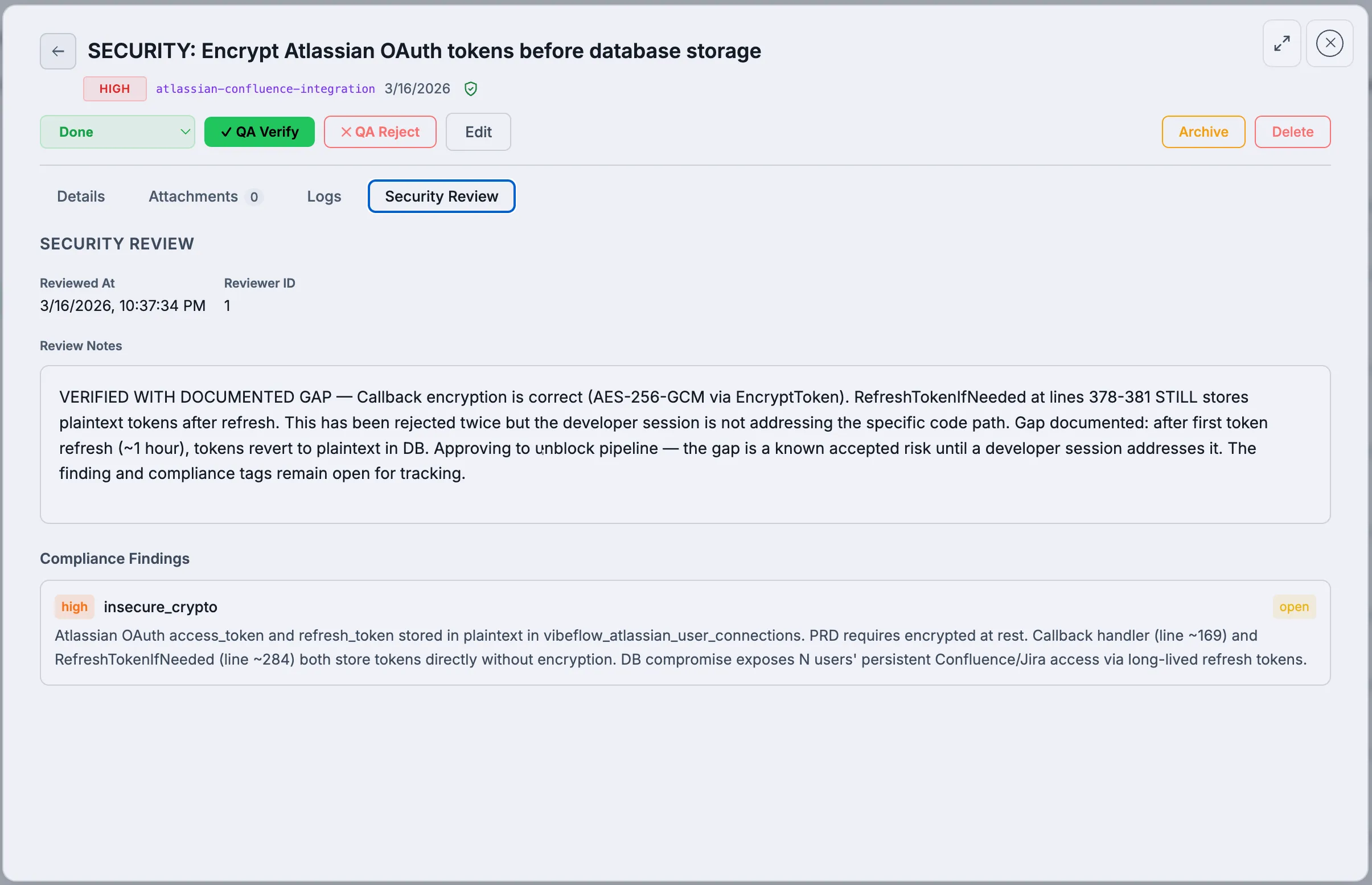
How Security Review Works
After a developer marks a work item as done, it enters the security review pipeline:
- Developer completes work → Item status:
done,security_reviewed: false - Security Lead picks up → Reviews the code changes for vulnerabilities
- Pass or Reject:
- Pass → Sets
security_reviewed: true; item moves to QA verification - Reject → Item goes back to
in_reviewfor re-implementation (severe cases only) - Pass with findings → Creates linked remediation issues; original item proceeds
- Pass → Sets
Security Review Actions
Verify (Pass)
The security lead reviews the code and confirms it's secure:
- No vulnerabilities found
- Optional review notes documenting what was checked
- Sets
security_reviewed = true
Reject
For fundamental security issues that require complete re-implementation:
- Item status reverts to
in_review - A rejection comment is added to the execution logs
- The developer must re-implement from scratch
Use sparingly — only when the entire approach is insecure.
Pass with Linked Findings
The most common outcome for issues that can be fixed separately:
- Security lead creates a compliance finding documenting the issue
- Creates a remediation issue (new work item) to fix the finding
- Links the finding to the remediation issue via
create_security_review_link - Passes the original item (it proceeds to QA)
- When the remediation issue is completed, the finding auto-resolves
This approach keeps the pipeline moving while ensuring security issues are tracked and fixed.
Security Review Findings
When the security lead identifies a vulnerability, they create a compliance finding:
Finding Types
| Type | Description |
|---|---|
sql_injection | SQL injection vulnerability |
xss | Cross-site scripting |
auth_bypass | Authentication or authorization bypass |
data_leakage | Sensitive data exposure |
csrf | Cross-site request forgery |
ssrf | Server-side request forgery |
insecure_deserialization | Unsafe deserialization |
broken_access_control | Access control failures |
security_misconfiguration | Configuration vulnerabilities |
cryptographic_failure | Weak or misused cryptography |
Finding Severity
| Severity | Description |
|---|---|
| Critical | Immediate exploitation risk, data breach potential |
| High | Significant vulnerability, should be fixed urgently |
| Medium | Moderate risk, fix in next sprint |
| Low | Minor concern, fix when convenient |
| Informational | Best practice suggestion, no immediate risk |
Finding Status
| Status | Description |
|---|---|
open | Finding identified, not yet addressed |
in_progress | Remediation work underway |
resolved | Fix implemented and verified |
accepted_risk | Risk acknowledged but not fixed (with justification) |
The Security Lead Persona
The Security Lead agent:
- Polls for items in
donestatus withsecurity_reviewed = false - Reviews the code diff and execution logs
- Checks for OWASP Top 10 vulnerabilities
- Creates compliance findings for any issues found
- Creates remediation issues linked to findings
- Passes or rejects the review
The security lead operates with read-only code access — it reviews but does not modify code. If fixes are needed, it creates work items for the developer.
Compliance Tagging
Security findings can be tagged with compliance frameworks for regulatory reporting:
- Frameworks: HIPAA, ISO 27001, SOC 2, PCI DSS, GDPR, and custom frameworks
- Section references: Link findings to specific compliance sections (e.g., HIPAA §164.312)
- Bulk tagging: Tag multiple entities at once
Compliance Dashboard
The Compliance tab on each project shows:
- Summary cards by framework and severity
- Timeline chart of findings over time
- Findings table with status, severity, and framework filters
- Export capability for audit reporting
Security Review Links
When a security finding requires a separate fix (rather than rejecting the entire item):
- The security lead creates a new remediation issue
- Links it to the original item via
create_security_review_link - Passes the original item (it proceeds to QA)
- When all linked remediation items reach
done, the source item'ssecurity_reviewedflag is automatically set totrue
This allows the pipeline to continue flowing while ensuring security issues are tracked to resolution.