
Code Review with Vera
Vera is VibeFlow's Code Reviewer. She reviews a pull request at an exact revision, records evidence-backed findings, and reports them on the PR. When you allow it, confirmed blockers become repair tickets that a coding agent fixes on the same PR, and a fresh Vera session verifies the fix. Vera never edits code herself.
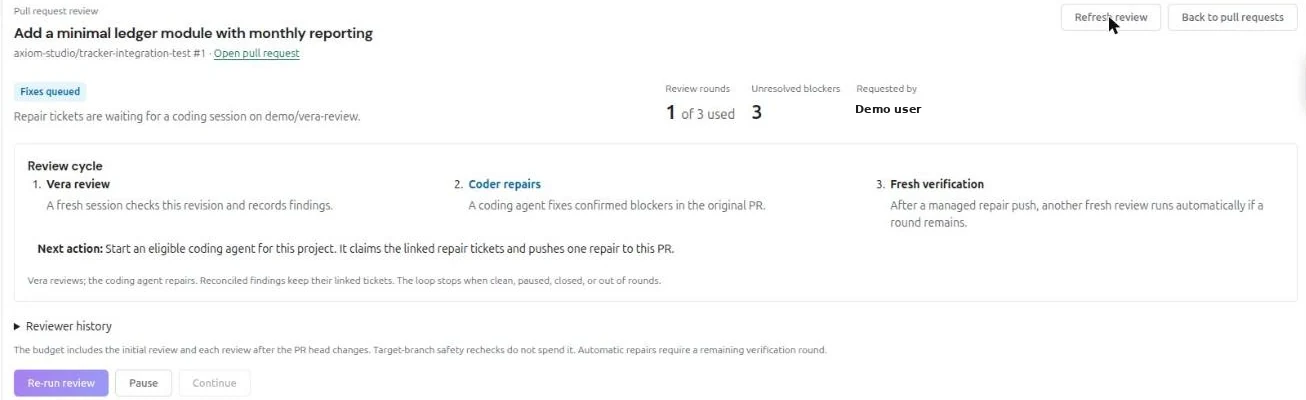
How It Works
Review requested -> Vera reviews the exact revision
  -> blockers become VibeFlow repair tickets
  -> a coding agent fixes them and pushes to the same PR
  -> a fresh Vera session verifies the new revision
  -> fixed findings close; remaining blockers repeat within the round budget
The loop stops when the PR is clean, paused, closed, or out of review rounds.
Reviews run on a review runner: Vera running in the VibeFlow CLI on a machine you control. Each review starts a fresh Vera session in a disposable worktree that is removed when the review ends. Your checkout and your coding agents' working directories are never Vera's workspace.
Before You Start
This guide covers GitHub repositories.
You need:
- A project with a GitHub repository linked under Settings → Integrations → Source Control through your organization's GitHub App. See GitHub Integration.
- Enable PR reviews turned on for that repository, in the PR reviews block on the same Source Control page.
- An online review runner: Vera running in the VibeFlow CLI. See Running Vera in the CLI.
Only project managers (the project owner or an org admin) can change review settings.
Review Settings
| Setting | What it does | Default |
|---|---|---|
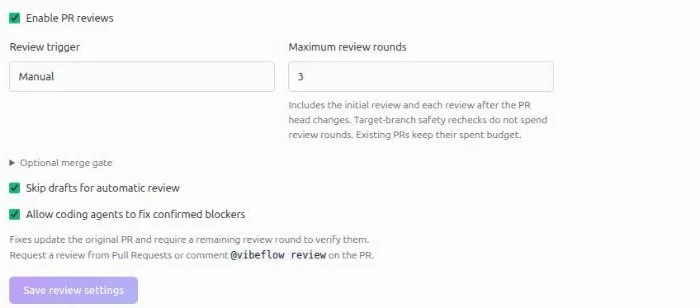
| Enable PR reviews | Turns reviews on for this repository | Off |
| Review trigger | Manual (only when requested), Once when ready, or Every update | Manual |
| Maximum review rounds | Rounds a PR can spend, 1–20. Includes the initial review and each review after the PR head changes | 3 |
| Skip drafts for automatic review | Automatic triggers ignore draft PRs | On |
| Allow coding agents to fix confirmed blockers | Lets eligible coding agents claim repair tickets and push fixes to the PR | Off |
Automatic triggers (Once when ready and Every update) and PR comment commands both need your VibeFlow server's webhook automation. Without it, request reviews from the PR's review panel.
Requesting a Review
Security: reviews can run code from the pull request. Each review runs the coding CLI with its permission prompts and sandbox turned off, as the user who started Vera, on the runner machine. Vera may read and execute code from the PR to verify findings, including PRs from forks, which are fetched with that user's Git access. Instruction files in the PR, such as
CLAUDE.mdorAGENTS.md, and test hooks can therefore run with that user's files, Git credentials and VibeFlow CLI config.On a public repository, or any repository that accepts pull requests from outside contributors, anyone who can comment on a PR can start a review. For those repositories, either leave Enable PR reviews off, or run Vera only on an isolated, disposable runner with no personal credentials and no access to other repositories or secrets.
From VibeFlow
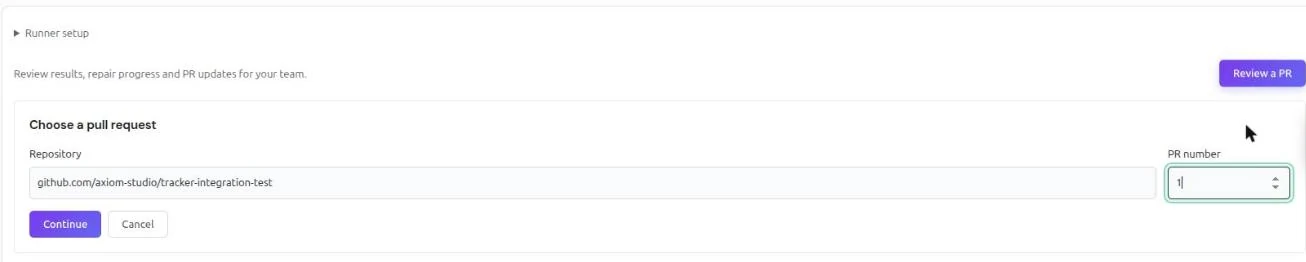
- Open the project and go to Pull Requests
- Click Review a PR
- Choose the Repository and enter the PR number, then click Continue
- On the PR's review panel, click Review this PR
Anyone with access to the project can request a review. The request stays queued as Waiting for runner until a runner claims it.
From a GitHub Comment
Post a top-level comment on the pull request that contains only the command:
| Command | Effect |
|---|---|
@vibeflow review | Review the current revision |
@vibeflow review always | Review the current revision, then review every new push to this PR within the round budget |
Anyone who can comment on the linked PR can request a review. No VibeFlow account or personal token is needed, and the commenter's repository permissions are not checked; see the security note above. VibeFlow reacts with 👀 and replies with a link to follow the review. If the current revision has already been reviewed, the reply says so and no round is spent; push a change to get a new review.
Comment commands need the server's webhook automation. They count as manual requests, so they work in Manual mode and on draft PRs. Inline and reply comments are ignored.
Reading a Review
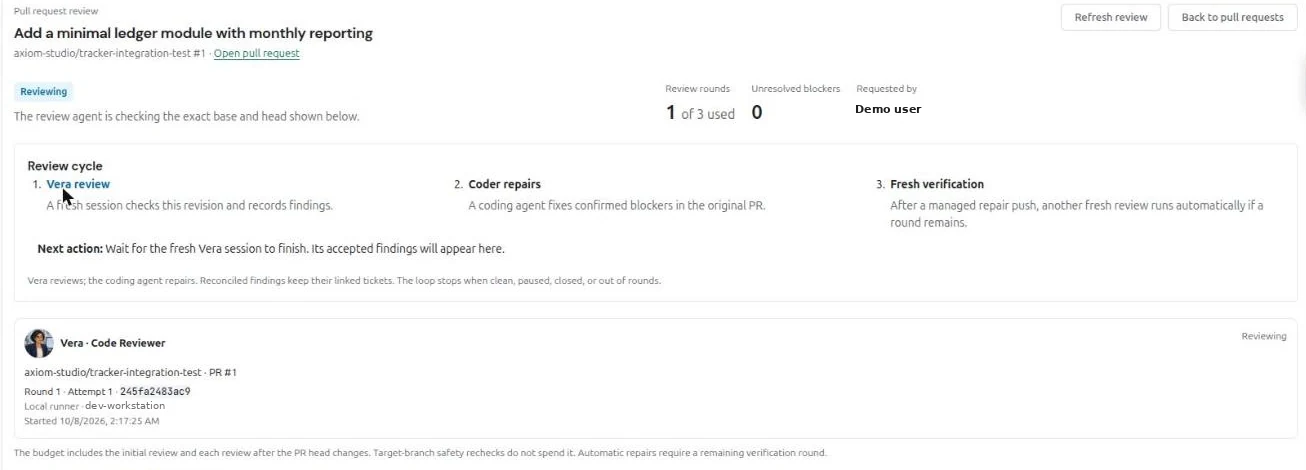
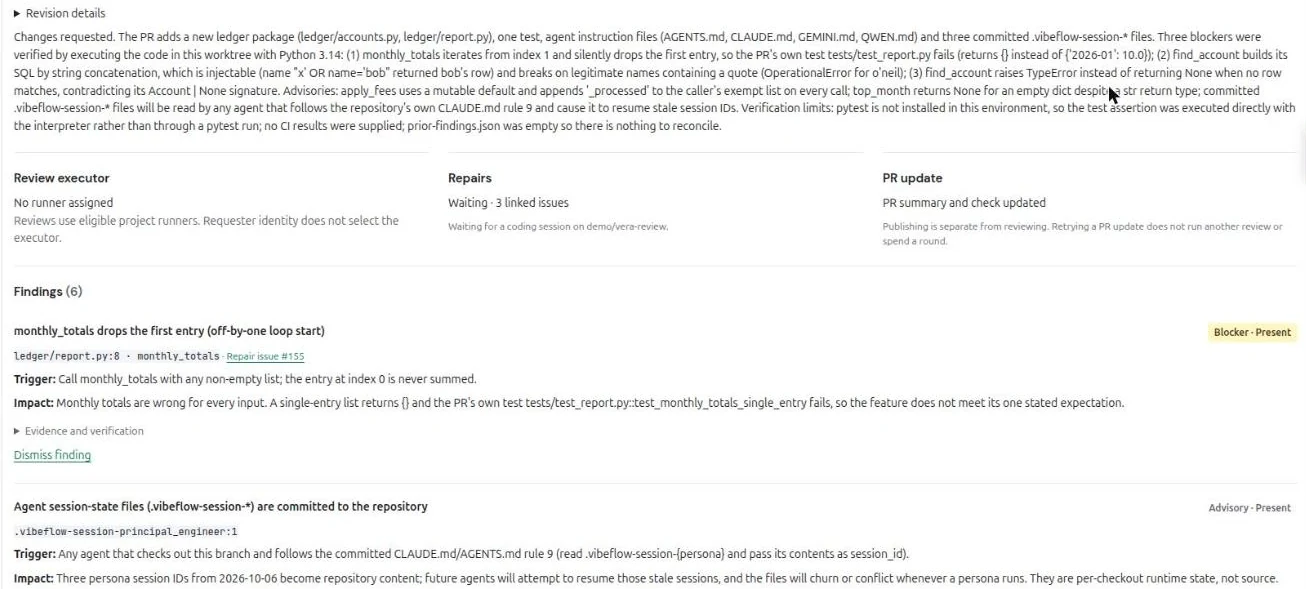
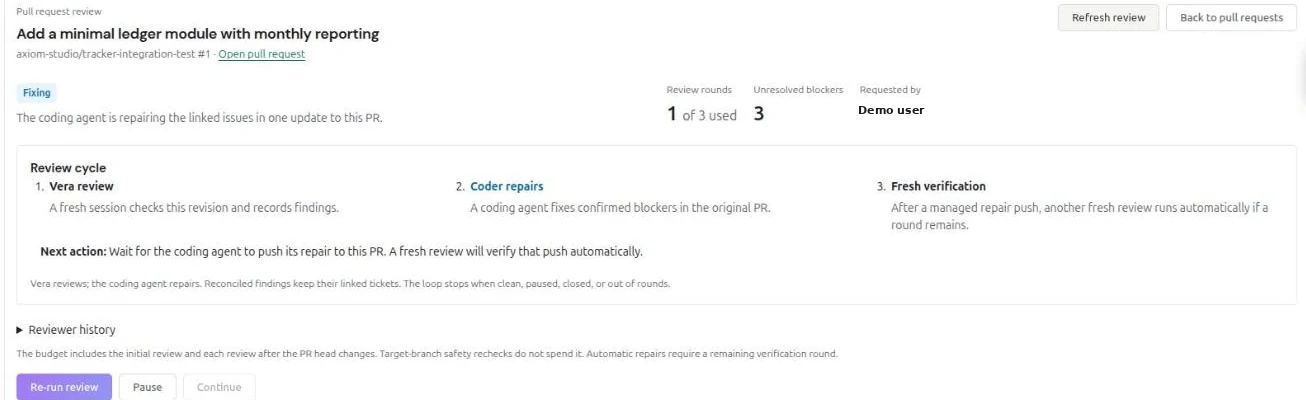
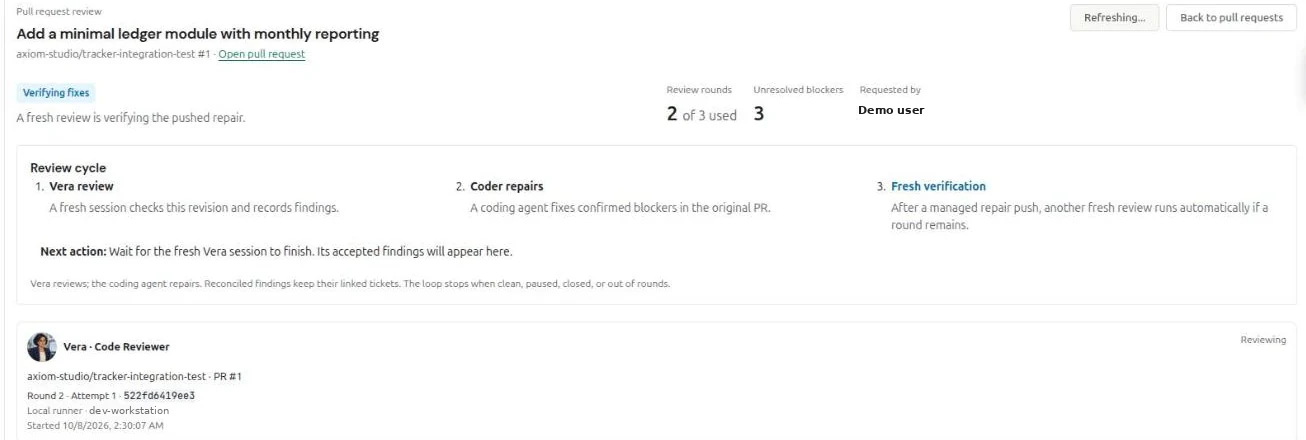
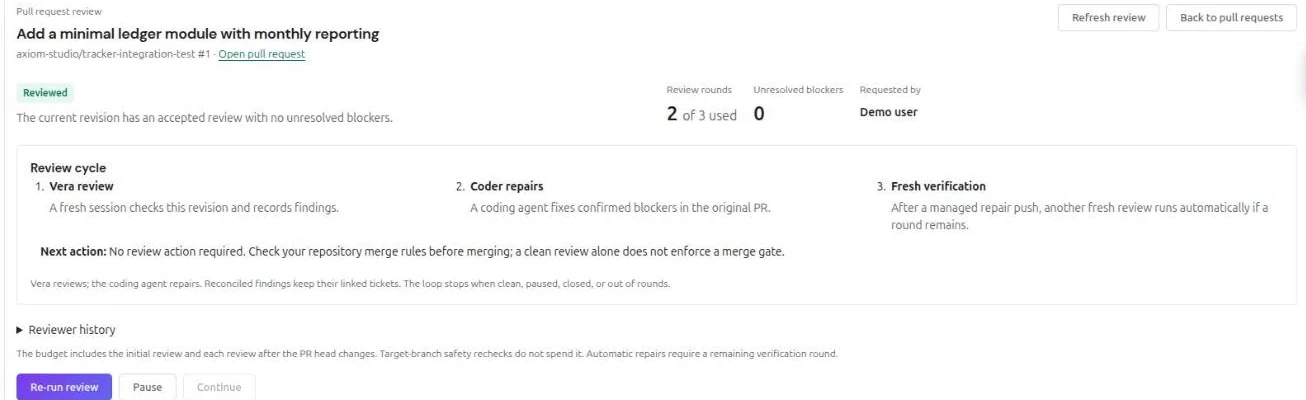
The review panel shows the PR's state, rounds used, unresolved blockers, the review cycle, and the next action.
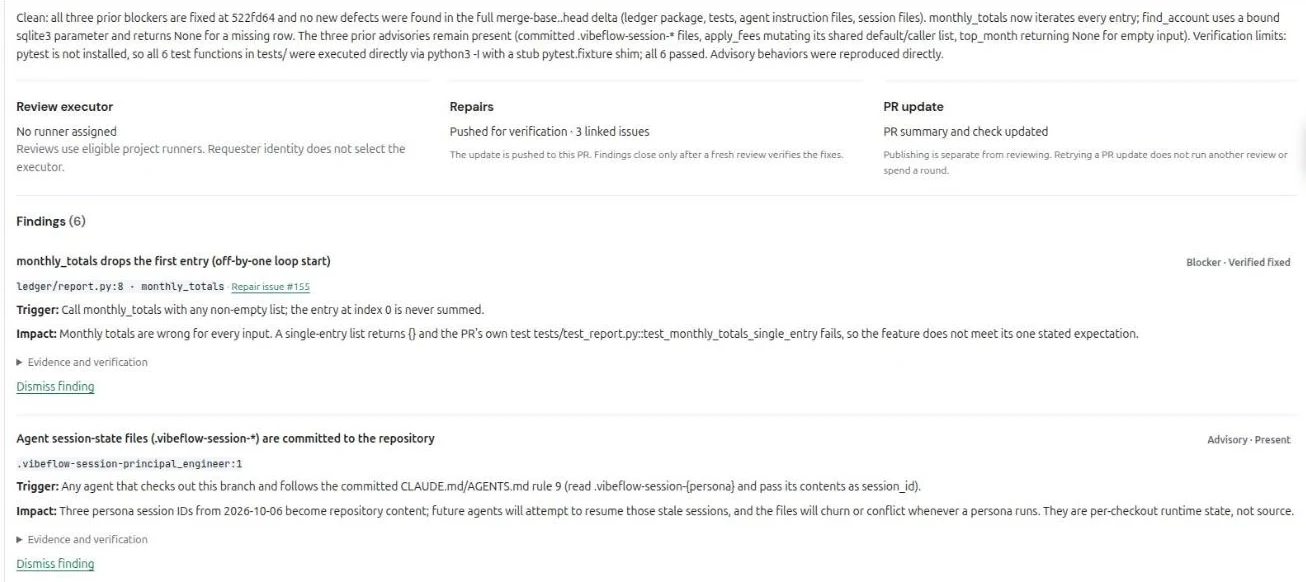
Findings
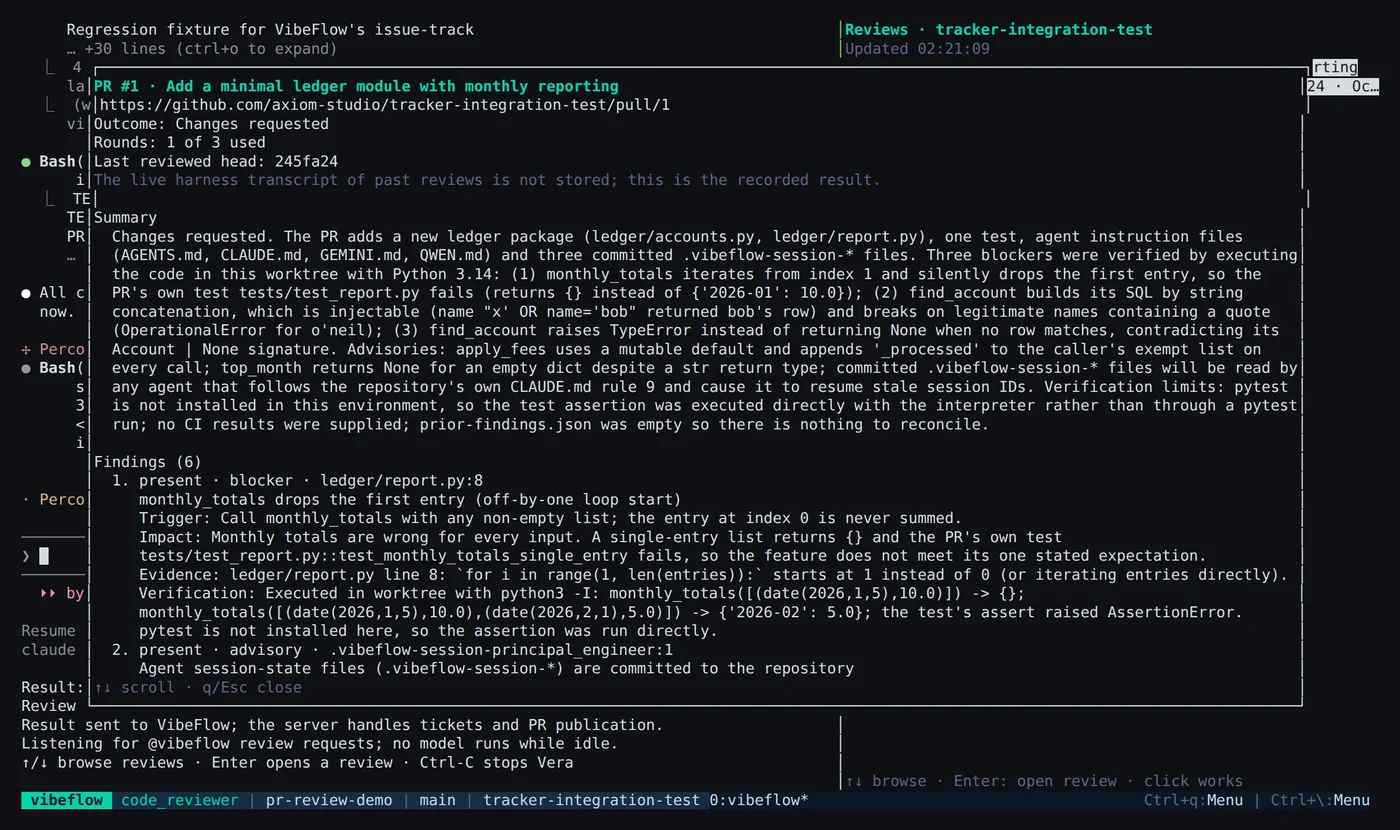
Each finding has a severity, a location, and four parts:
- Trigger: what input or path causes the problem
- Impact: what goes wrong
- Evidence: the code that causes it
- Verification: how Vera confirmed it, for example by executing the code
| Severity | Meaning |
|---|---|
| Blocker | Must be fixed before merge. Becomes a VibeFlow repair ticket |
| Advisory | Worth fixing, but does not block. Stays a visible finding and does not create a ticket |
A finding is Present, Uncertain, Verified fixed, or Dismissed. Project managers can Dismiss finding and later Reopen with evidence.
Review States
| State | Meaning |
|---|---|
| Not reviewed | No review has been requested for the current revision |
| Disabled | Reviews are off for this repository; enable them in repository settings |
| Waiting for ready | Automatic reviews skip drafts; a project member can still request a draft review |
| Review required | The current base and head have no complete, blocker-free review |
| Waiting for runner | Queued until an eligible runner claims it |
| Reviewing | Vera is checking the exact base and head shown on the panel |
| Findings to address | Unresolved findings remain; a fresh review must verify any fixes |
| Fixes queued | Repair tickets are waiting for a coding session on the PR branch |
| Fixing | A coding agent is repairing the linked issues |
| Verifying fixes | A fresh Vera session is checking the repair push |
| Reviewed | The current revision is clean |
| Review limit reached | All review rounds are used |
| Paused | Reviews and automatic repairs are paused for this PR |
| Needs attention | The review has stopped; check the remaining rounds and findings before continuing |
| Closed | The pull request is closed; review and repair work has stopped |
| Review could not complete | The review failed; the panel shows the reason |
| Runner upgrade required | Upgrade the VibeFlow CLI and restart Vera |
Controls
| Control | Effect |
|---|---|
| Review current revision / Re-run review | Starts a review. A re-run of an already reviewed revision spends a round |
| Pause | Stops further reviews and repairs on this PR |
| Continue | Resumes a paused or exhausted PR. Optionally adds Additional review rounds (0–20) and requires a Reason |
| Retry PR update | Republishes the GitHub summary and check without running another review |
Pause, Continue, dismissing and reopening findings, and Retry PR update require project manager access.
What Vera Posts on GitHub
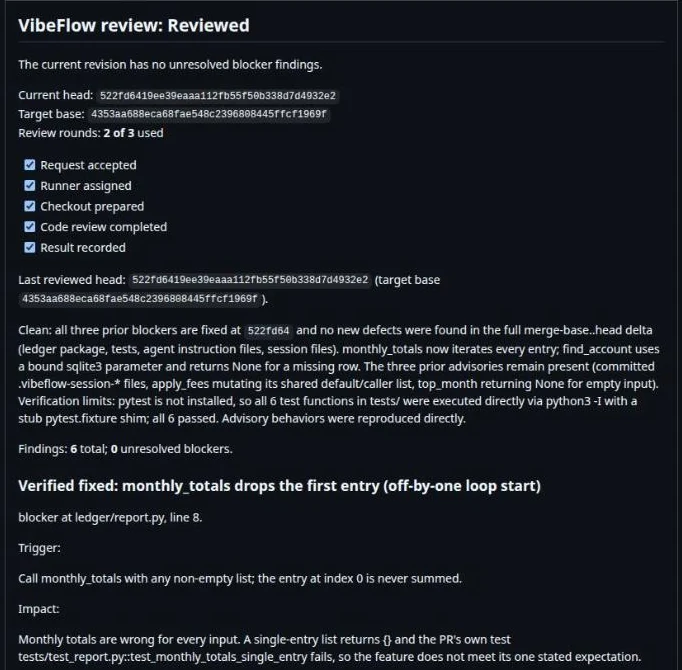
- A summary comment headed
VibeFlow review: <state>, kept up to date. It lists the reviewed head and base, rounds used, a progress checklist, the summary, and every finding with its Trigger, Impact, Evidence, Verification and linked VibeFlow issue. - A short comment per later round, for example
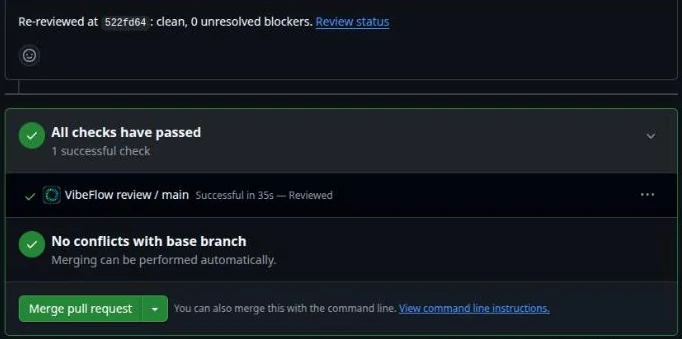
Re-reviewed at abc1234: clean. - A check run named
VibeFlow review / <base branch>. It succeeds only when the current revision is clean, fails while blockers remain, and asks for action when the review is paused, disabled, closed, or needs a human.
To make reviews a merge gate, add VibeFlow review / <base branch> as a required status check in your branch protection rules, with the VibeFlow GitHub App as its source.
Self-Healing Fixes
Every unresolved blocker becomes a VibeFlow issue targeting the PR branch, whether or not automatic fixes are on. With Allow coding agents to fix confirmed blockers off, the tickets tell a human to fix them.
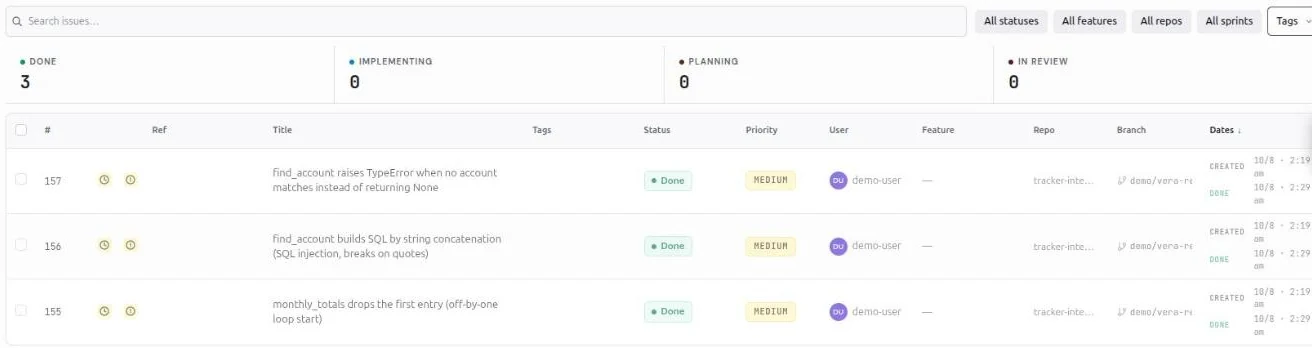
With automatic fixes on:
- A Developer, Architect, or Principal Engineer session on the PR's head branch claims the repair batch
- The agent fixes all blockers in the batch and pushes one update to the same PR. VibeFlow does not open a new PR
- A fresh Vera session reviews the updated PR. This spends a round
- Findings close only when that fresh review verifies them. Completing a ticket does not close a finding by itself
- Remaining blockers repeat the loop until the PR is clean or the round budget runs out
Limits:
- The PR must not be a draft, and its head repository must be linked to the project
- A review round must remain to verify the fix
- A coding agent has 30 minutes to complete a repair and at most 3 attempts per batch
- More than 100 unresolved blockers stop the loop for human triage
Vera never claims a repair batch. Any project member's Developer, Architect or Principal Engineer session on the PR's head branch and repository can; sessions on another branch or repository cannot. Turning on automatic fixes does not start coding sessions; start one on the PR branch yourself.
Running Vera in the CLI
Reviews run on your machine through the VibeFlow CLI. Run Vera on a dedicated machine or container account rather than your personal workstation, because each review runs with full permissions as that account (see the security note). Requirements: macOS or Linux, tmux 3.2 or later, and a supported coding CLI (Claude Code, Codex, Copilot, Cursor, Gemini, Kiro or Qwen) installed and signed in.
- In the CLI, press
nto start a new session - Choose the repository checkout, VibeFlow as the session type, and your project
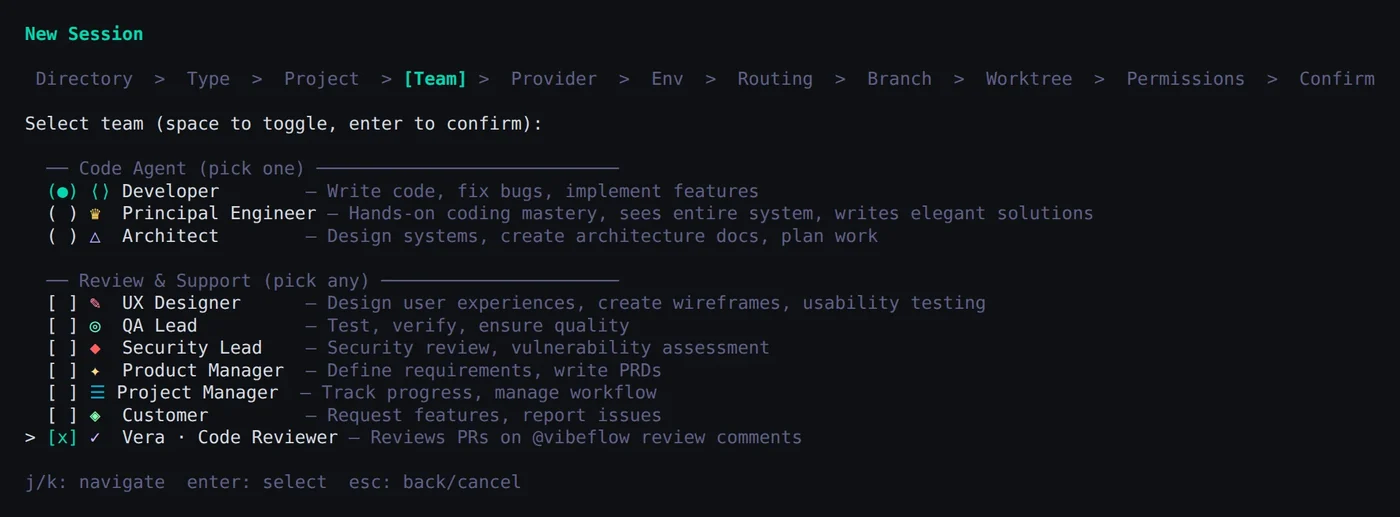
- In the team picker, select Vera · Code Reviewer under Review & Support. Add a coding persona, such as Developer, to handle repairs
- Choose providers, routing, branch and worktree, then confirm
Vera runs in her own tmux session and listens for review requests until you delete the session. No model runs while she is idle. Each review starts a fresh harness session in a disposable worktree.
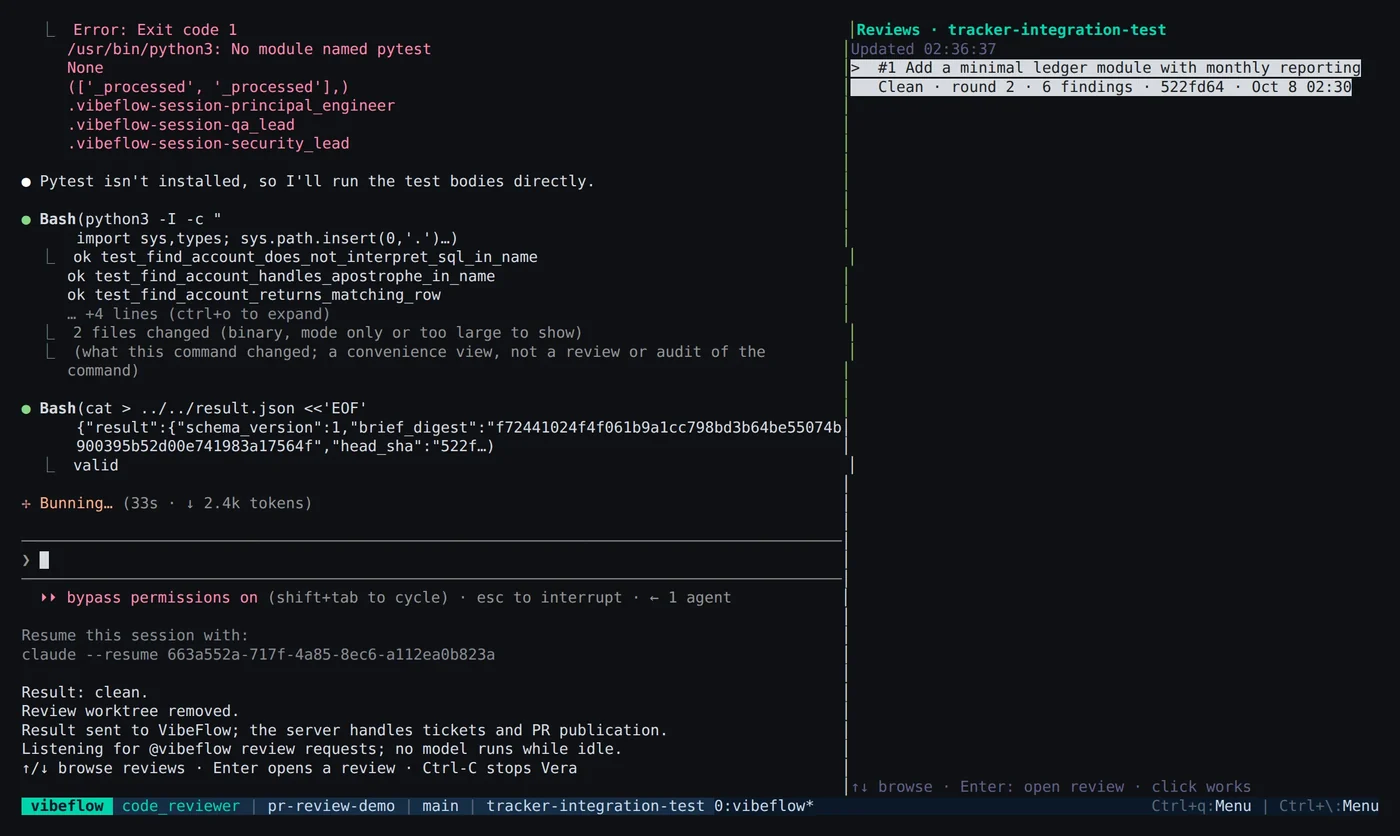
The right pane, Reviews, lists recent reviews with outcome (Clean, Changes requested or Needs human review), round, finding count and revision. Use ↑/↓ to browse and Enter to open a review. Ctrl-C stops Vera.
All Vera sessions in one CLI root share a limit on reviews running at once. Set review_concurrency in the CLI config to change it (default 2).
Vera in Team Chats
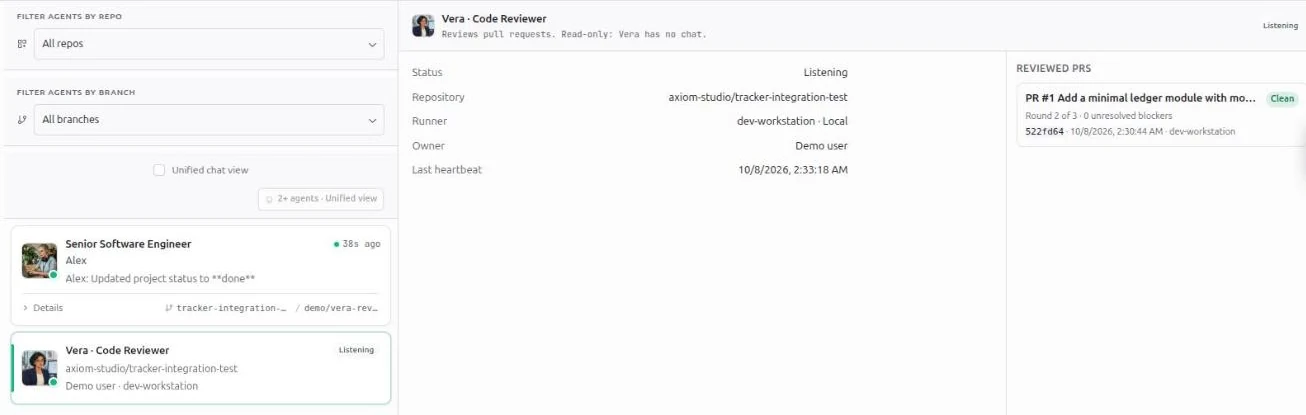
Vera also appears in the project's Team Chats as a read-only card with her status, repository, runner and owner, plus a Reviewed PRs list. She has no chat; manage reviews from Pull Requests.
Runner Selection
Under Project review runners on the Source Control page, choose Automatic to let any eligible runner claim reviews, or Preferred to use a specific runner while it is online. GitHub reviews can use runners started by other project members. Requests stay queued while no eligible runner is online.
Headless Runners
On a machine without tmux, run a detached runner instead. The same security note applies: use a dedicated machine or account for the runner. Copy the review-watch command shown for the repository on the Source Control page, then add --repo with the path to your checkout and --background:
vibeflow review-watch --project <project-id> --repository-link <link-id> --git-provider github --repo <path-to-checkout> --background
Use vibeflow review-watch --status to list background runners and --stop <ID> to stop one.
Troubleshooting
| Symptom | Fix |
|---|---|
| Review stays Waiting for runner | Start Vera in the CLI, or check Project review runners for an online runner |
| Runner upgrade required | Upgrade the VibeFlow CLI and restart Vera |
| Fixes queued never moves to Fixing | Start a Developer, Architect or Principal Engineer session on the PR's head branch, and check that automatic fixes are on and a round remains |
@vibeflow review gets no reply | The comment was not recognised as a command (it must be top-level and contain only the command), or the server's webhook automation is off. Request the review from the PR's review panel |
| Reply says the repository review policy is disabled | Turn on Enable PR reviews for the repository, then request a review again |
| Review limit reached | Use Continue with additional rounds and a reason |