
Azure Repos
Use Azure Repos Git as a project's source-control provider for repository links, branches, pull requests, and HTTPS clone/push from agents and Cloud Runners. The integration reuses the organization's saved Azure DevOps connection. Boards project bindings and work-item sync remain separate from repository links.
The feature_azure_devops flag must be enabled for the organization. Azure Repos
is the fourth source-control choice alongside GitHub, Bitbucket, and GitLab.
This integration supports Git repositories over HTTPS. TFVC, Azure Pipelines,
Azure Wiki and Azure SSH remotes are outside its scope. Vera pull-request reviews
are covered in Vera pull-request reviews.
The saved deployment type and API version remain authoritative; this feature
does not add a new Azure DevOps Server setup flow or establish compatibility
with additional Server versions.
Upgrade an existing Boards connection
An organization admin manages the shared connection under Integrations → Azure DevOps → Setup. Keep the existing organization URL when upgrading access.
- Create a dedicated PAT with Code (Read & Write). If Boards is in use, retain Work Items (Read & Write) as well.
- Choose Replace beside the stored token, enter the replacement in the password field, and select Save changes. No second Azure login is needed.
- Select Test connection to check the Boards connection, then Test repository access to check repository access using the saved connection.
- Check the repository, branch, and service-hook permissions of the PAT's identity. PAT scopes do not override repository or project permissions.
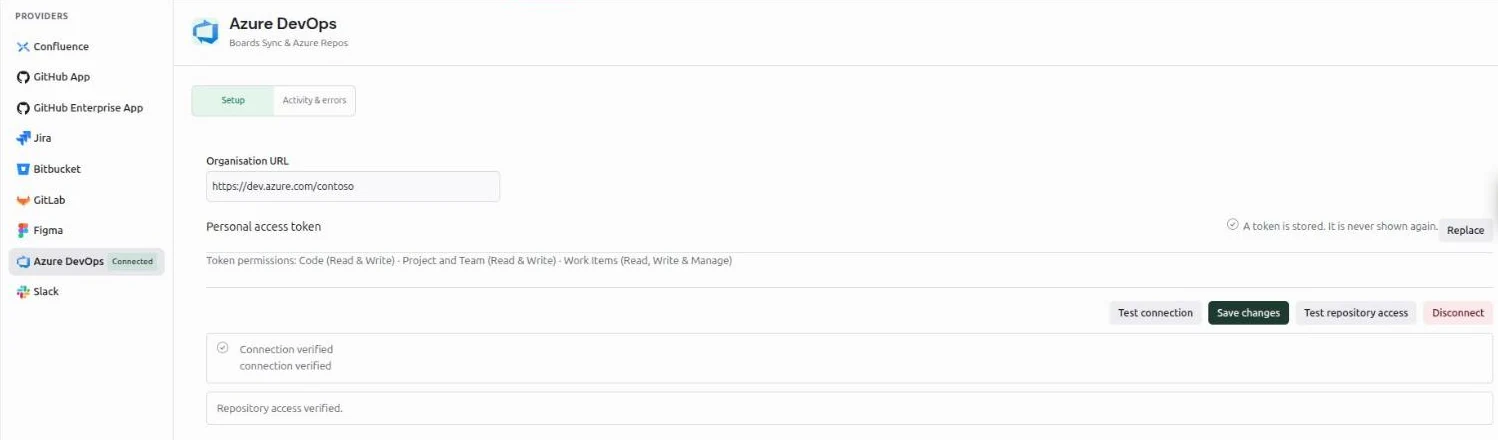
The PAT is encrypted when saved and is never returned to the browser or through MCP. An empty token on save preserves the existing credential. Use Disconnect to delete it. Give the dedicated identity access only to the repositories and work items it needs: the PAT's actual permissions determine its authority.
The repository test confirms the token can see your repositories. If a later write (push, branch, PR, comment, status or service hook) is denied, VibeFlow reports it on that operation. A repository-only authentication denial does not invalidate Boards health unless a separate Boards probe also confirms an authentication failure.
Link repositories
Open Project Settings → Integrations → Source Control and select Azure Repos. Optionally choose an Azure project, select a repository, and choose Link Repository. Repeat to add more repositories from the same connection.
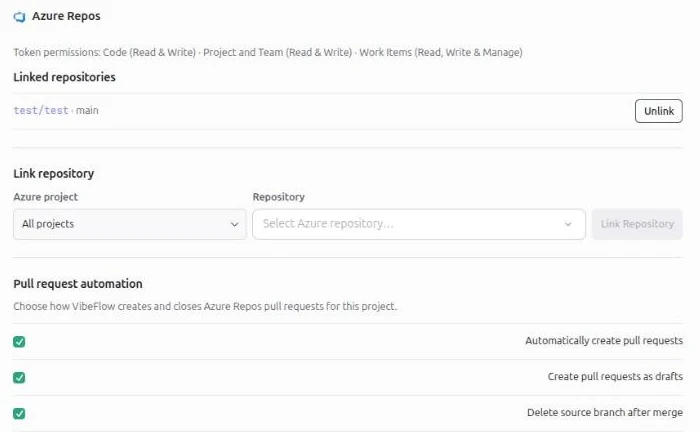
Search filters the repositories already loaded into the picker. If the response is truncated, the panel says so; choose an Azure project to narrow the result. Typing a name does not create a link to an unverified repository.
A project can link multiple Azure repositories, but only one source-control provider at a time. Unlink existing GitHub, Bitbucket, or GitLab repositories before switching to Azure Repos. The conflict banner offers that unlink action. Boards bindings are independent: a project can use Boards with another Git provider, or Azure Repos with another work-item tracker.
For API or MCP calls, repository_link_id is the numeric VibeFlow link ID, not
an Azure repository GUID. Obtain it from:
GET /rest/v1/vibeflow/projects/42/azure-devops/repos
The response's repos entries include id, Azure project/repository GUIDs,
names, clone_url, web_url, and default_branch. Choose an exact link when
several repositories are linked. The backend rejects ambiguous selections.
Unlink removes the local repository link and its PR mappings and attempts to remove its remote service hooks. It remains available when the shared connection is disabled. Boards links are kept. See service hooks for cleanup warnings.
Branches and pull requests
Push the source branch before creating a PR. An agent using native Git can use its configured HTTPS credential helper:
git switch -c feature/update-api
git push --set-upstream origin feature/update-api
Branch listing and creation also have authenticated REST endpoints. These
examples use project 42 and linked repository 17; substitute actual IDs.
GET /rest/v1/vibeflow/projects/42/azure-devops/branches?repository_link_id=17
POST /rest/v1/vibeflow/projects/42/azure-devops/branches
Content-Type: application/json

{"repository_link_id":17,"name":"feature/update-api","source_branch":"main"}
Omitting source_branch uses the linked repository's default branch. Plain
branch names and refs/heads/... names are accepted. Listing requires project
read access; branch creation requires project settings permission. The unified
GET /rest/v1/vibeflow/projects/42/branches?repository_link_id=17 route uses the
same repository selection.
MCP tools
create_pr detects Azure Repos from the linked project. The provider-specific
tools are:
| Tool | Arguments and behavior |
|---|---|
create_azure_devops_pr | project_id, title, head, and registered sid or session_id; optional repository_link_id, repo, base, body, draft |
list_azure_devops_prs | project_id, repository selector, and optional state: all, open, draft, merged, or closed |
comment_azure_devops_pr | project_id, repository selector, positive pr_id, and comment body |
An exact repository_link_id is the clearest selector. repo can identify a
linked repository by its full Azure project/repository name or repository
GUID. No selector is needed when there is exactly one matching link.
Example arguments to create_azure_devops_pr:
{
  "project_id": 42,
  "repository_link_id": 17,
  "sid": 123,
  "title": "Update API handling",
  "head": "feature/update-api",
  "base": "main",
  "draft": true
}
Use the registered session's actual ID. base defaults to the linked default
branch; draft defaults to true. If body is omitted, VibeFlow generates it
from repository-scoped work on the source branch. A successful create returns
pr_id, pr_number, pr_url, provider, and repository_link_id. If the
response warns that the PR exists but its association could not be saved, use
the returned URL instead of creating another PR.
Automatic creation and the project feed
New repository links enable these settings by default:
- Automatically create pull requests when a feature or issue completes.
- Create pull requests as drafts.
- Delete source branch after merge.
The settings apply to all Azure repositories linked to that VibeFlow project. For automatic creation, the work item's target branch becomes the source and the linked repository's default branch becomes the destination. No PR is created when both are the same. With multiple links, assign the work item's target repository; VibeFlow does not guess. Existing tracked PRs and active remote PRs for the same source/destination are checked before a new PR is opened.
Automatic completion runs one job per organization at a time, with at most eight running or waiting jobs per organization and 128 across each application process. Waiting counts toward the job's two-minute timeout. A slow Azure connection does not hold another organization's lock. When capacity is full, the work item stays Done and integration activity records the skipped automatic PR; retry completion or create the PR manually. Pending jobs are in memory, so restarting the application does not retry them automatically.
The project's Pull Requests tab lists Azure PRs tracked by VibeFlow, with
their title, branches, originating work item, and draft/open/merged/closed state.
It does not import every PR that exists in Azure. list_azure_devops_prs can
list remote PRs independently without adding them to the project feed.
Service hooks update known mappings, and feed reads refresh stale metadata;
Refresh requests a provider refresh. When Azure cannot be read, the last
known metadata remains visible. Once a mapped PR is merged, stale updates do
not move it back to an open state. Azure PRs do not offer Vera review execution.
Service hooks
Linking attempts to subscribe to PR-created, PR-updated and PR-comment events
for the selected Azure repository. Comment events carry the @vibeflow review
commands used by Vera pull-request reviews. The PAT identity needs permission to create and
delete service-hook subscriptions in the Azure project, in addition to the
repository permissions needed for PR operations. A successful read test does
not verify those hook permissions.
The operator must configure BASE_URL as the publicly reachable HTTPS
application address. Azure must be able to deliver to:
https://vibeflow.example.com/rest/v1/webhooks/azure-devops/{organization_id}/{repository_link_id}
The callback uses Basic authentication with a generated delivery secret. The secret is encrypted locally and is absent from the callback URL and public repository settings. Preserve the Authorization header through the proxy and use a trusted TLS certificate. Do not append credentials to the URL.
If subscription setup fails, the repository stays linked and the response/UI shows a warning that live updates are unavailable. Correct the public URL and hook permissions, then unlink and link the repository again. Feed refresh remains available during that repair. A hook does not import an unknown PR or infer a successful merge from a merge-attempt event.
Unlink attempts remote cleanup before deleting the local link. If remote cleanup fails, unlink still completes and returns a warning. Remove the remaining subscriptions from the Azure project's service-hook settings. Deliveries for the deleted link are no longer authorized locally. Disconnecting the organization connection keeps repository links; it is not a substitute for unlinking repositories and cleaning up their subscriptions.
Vera pull-request reviews
Vera reviews Azure Repos pull requests through the same review lifecycle as GitHub: exact-revision reviews, findings, repair tickets, fresh verification and round budgets. This section covers what differs for Azure Repos.
Requirements
- A repository linked as described above, using the organization's saved Azure DevOps connection. No separate login or personal connection is needed.
- A PAT identity with Code (Read & Write) and permission to read the repository, comment on its pull requests and set pull-request statuses. Service-hook permissions are needed for automatic triggers and comment commands (see Service hooks).
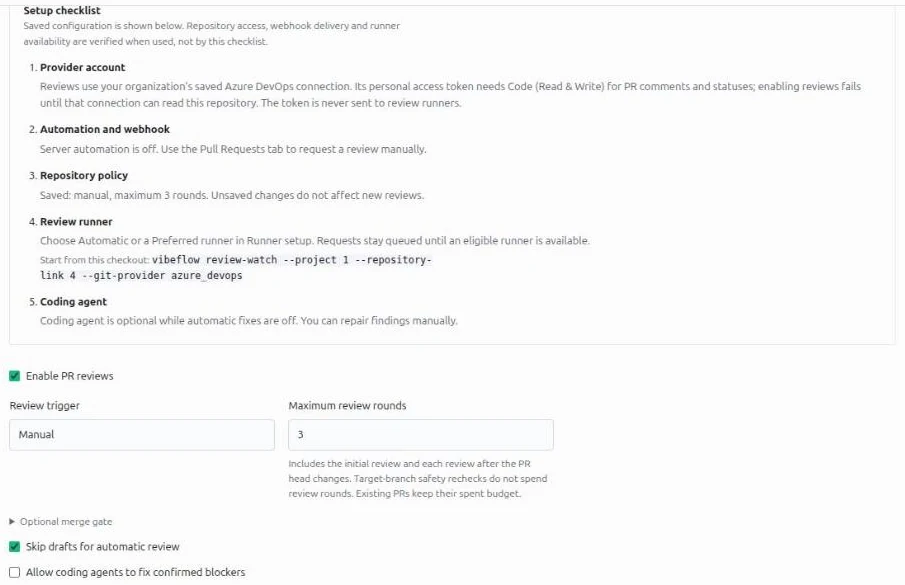
- An online review runner: Vera in a VibeFlow CLI release that supports Azure Repos review checkout. Start it from a checkout of the repository with the command shown in the repository's PR reviews block. Until an eligible runner is online, review requests stay queued.
Enable reviews
A project manager opens Settings → Integrations → Source Control, selects Azure Repos, and uses the PR reviews block under the linked repository. Saving with Enable PR reviews on first checks that the saved connection can serve this repository. If the connection is missing, disabled, unhealthy, or was replaced after the repository was linked, the save fails with a message to check the connection and its Code permissions; the policy stays off. Other project members can request and read reviews within the project's normal access rules.
Triggers and comment commands
Manual requests work from the pull request's review panel. Once when ready,
Every update and comment commands depend on the service hooks and on the
server's webhook automation. Automatic reviews are owned by the project manager
who last saved the repository's review policy, so that user must stay active
with project access; a periodic scan also picks up active pull requests whose
webhook was missed. Supported commands are the top-level comments
@vibeflow review and @vibeflow review always. VibeFlow ignores replies,
inline (file) comments, edited or deleted comments, and its own summary. The
comment author's Azure uniqueName must be the email address of an active user
in the same VibeFlow organization with access to the project. Before acting,
VibeFlow re-reads the pull request and the comment thread from Azure; the
webhook body is only a scheduling hint.
Pull requests from forks are refused: the organization connection is only proven for the linked repository, so VibeFlow does not review a fork's source.
Exact revisions and checkout
Each review records the source and target commits of the pull request's latest Azure iteration. The runner fetches exactly those commits into a disposable worktree through a read-only Git endpoint on the VibeFlow server, using its VibeFlow runner authorization. The server adds the Azure credential when it forwards the fetch to the linked repository, and only for the duration of a live review attempt. The PAT is never sent to the runner, the CLI supervisor, or Vera's review process, and the endpoint cannot push.
Use a dedicated, isolated review runner. A review can execute code from the pull request as the user who started Vera, so that account should hold no unrelated credentials.
What Vera posts on Azure
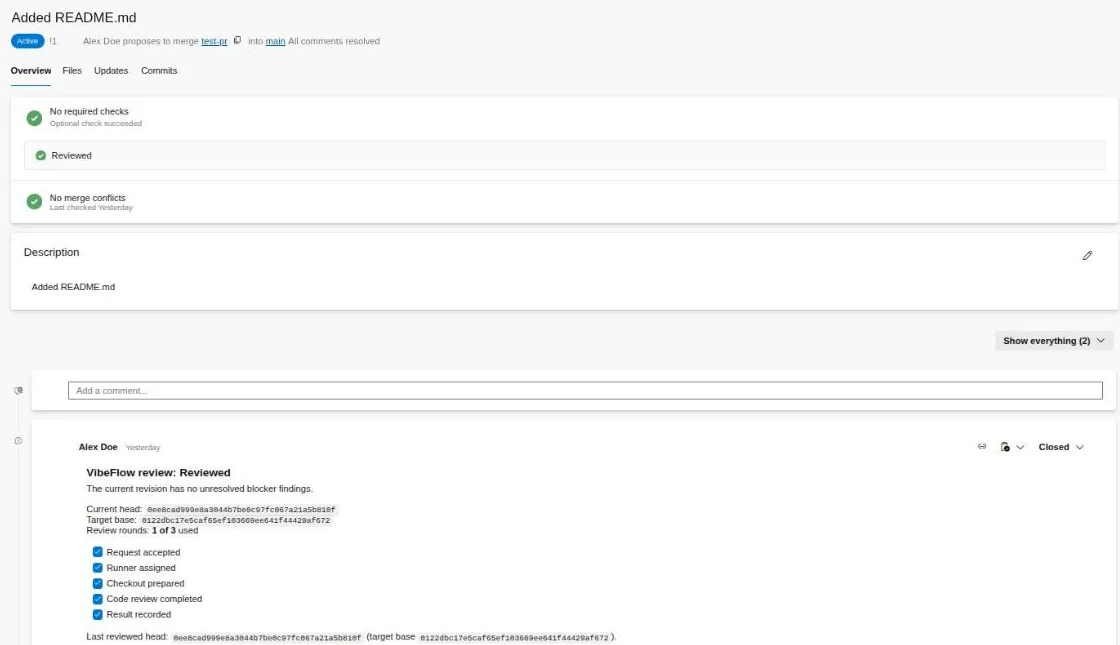
- One summary thread on the pull request, updated in place as the review progresses. Retries update the same thread rather than adding new ones. VibeFlow's threads are created closed, so they never block a comment-resolution branch policy.
- A pull-request status with genre
vibeflowand nameVibeFlow review, posted against the iteration whose commits were reviewed: pending while reviewing, succeeded only when the current revision is clean, and failed when blockers remain, a human is needed, or the review is paused, disabled or closed, so those states never count as passing. A status for an older revision is never posted over a newer one. - A short reply thread acknowledging each comment command.
To make the review a merge gate, add a Require a successful status branch
policy for vibeflow/VibeFlow review on the target branch.
Cost and limits
Each review and each re-review of a new head spends one review round from the repository's budget and runs a fresh model session on your runner. Runner CPU, memory, disk and model tokens depend on the diff size, project context and the coding harness; no fixed cost or duration applies. Blocker repair is a separate coding-agent session, and its verification spends another round.
Troubleshooting
| Symptom | Check |
|---|---|
| Enabling reviews fails with a connection message | Test the saved connection and repository access, confirm the PAT has Code (Read & Write), and relink the repository if the connection was replaced |
| Comment commands do nothing | The comment must be a new top-level comment by an organization member whose Azure uniqueName matches their VibeFlow email; confirm the PR-comment service hook exists |
| Reviews stay queued | Start an eligible review runner with Azure Repos checkout support from a repository checkout |
| Review blocked with "repository changed" | The repository was relinked, moved or its connection replaced; request a new review |
| Fork pull request refused | Fork reviews are not supported for Azure Repos |
Azure Pipelines, TFVC and reviews of unlinked fork repositories are out of scope.
HTTPS credentials for local agents
The saved organization PAT authenticates VibeFlow's API operations. It is not exported to a local agent, and this feature does not install a new local Git credential helper. Configure HTTPS Git authentication on the machine running the agent before starting its session.
Use an OS-backed helper, such as Git Credential Manager, following the Azure Repos credential-manager setup. For PAT authentication, supply a nonempty username and enter the credential through the helper's secure prompt. Keep the remote URL credential-free:
git remote set-url origin https://dev.azure.com/your-organization/your-project/_git/your-repository
git config --local credential.useHttpPath true
git ls-remote origin HEAD
credential.useHttpPath includes the repository path in the credential context;
it does not reduce the PAT's server-side permissions. See the
Git credential documentation.
Do not place a PAT in the remote URL, shell arguments, environment variables,
agent prompts, or logs. A successful ls-remote is a read check, not proof of
push permission. VibeFlow connection replacement does not update credentials
stored by independent local helpers.
Managed Cloud Runner credentials
In the Cloud Runner creation wizard, linked Azure projects offer Azure Repos organisation connection in the Git step. It uses the saved connection. Choose a linked repository and branch; a single linked repository is selected by default, while multiple links require an explicit choice. An explicitly selected ordinary Git provider retains its own credential flow.
The creation API selects managed Azure credentials when gitProviderId is
omitted and no GitHub Enterprise target takes precedence. Send linked canonical
clone_url values in gitRepos; arbitrary URLs are rejected. No managed
provider ID or PAT is exposed for browser selection. Managed provider records
cannot be renamed, deleted, or selected through the ordinary provider list.
Rotation, disconnect, and manual recovery
Saving a replacement PAT attempts to update the managed provider and installed Git helper. Failed cleanup is recorded durably and retried. A running workload may still have credentials mounted from before the update. VibeFlow does not automatically stop or restart it.
- Save the replacement PAT in Integrations → Azure DevOps.
- If the connection reports a runner credential warning, stop and restart the affected runners to refresh their mounted credentials.
- Confirm the warning clears after a successful explicit start refresh. Updating the helper alone does not clear a required-restart warning.
- Revoke the previous PAT in Azure to invalidate copies outside VibeFlow, including independent helpers and previously mounted credentials.
For an already Azure-bound runner, an authorized caller can request a helper
refresh with POST /rest/v1/vibeflow/projects/42/cloud-runners/7/git-credentials
and body {"provider":"azure_devops"}. This does not itself restart the workload.
Disconnect deletes the saved PAT and attempts to invalidate managed
credentials. Stop affected runners and revoke the old PAT in Azure. Repository
and Boards links remain, but new authorized Azure operations require a valid
connection. Credential cleanup or workload-refresh warnings persist across
page reloads through runner_credential_warning on connection responses.
Do not interpret a successful save or disconnect as proof that every running
process has discarded an old credential.
Operator rollout, rollback, and validation
PostgreSQL and SQLite have matching migrations:
| Version | Added state |
|---|---|
20261026010000 | Azure repository links |
20261026020000 | Repository-scoped PR mappings and metadata |
20261026030000 | Managed runner credential bindings and durable cleanup/restart flags |
Back up the database and apply the application's normal migrations before enabling the feature. Existing Boards credentials and bindings are reused; repository linking remains an explicit step. No existing Git provider is converted into Azure Repos.
To stop PR automation while retaining Boards, disable automatic PR creation,
stop affected Azure runners, and unlink the Azure repositories. Resolve remote
hook cleanup warnings while the connection is still usable. Disabling
feature_azure_devops affects both Boards and Repos and does not revoke a PAT
or remove credentials from an already-running workload.
Schema rollback is destructive: the down migrations drop the corresponding tables, including links, PR mappings, and runner cleanup state. Stop workloads, clean remote hooks and credentials, and retain a backup before a coordinated rollback. Apply down migrations in reverse order; do not drop runner binding state while cleanup still depends on it. The schema rollback does not revoke Azure PATs or remove remote hooks on its own.
Before release, run the full frontend tests, lint, and production build, then the backend and root Go suites and vet. Complete the frontend build before Go verification because the backend embeds its output. From the repository root:
cd axiomcloud/frontend
npm test
npm run lint
npm run build
cd ..
go test -timeout 30m ./...
go vet ./...
cd ..
go test -timeout 30m ./...
go vet ./...
Use local HTTP fixtures and isolated SQLite/PostgreSQL databases for regression coverage; keep live Azure acceptance credentials unset. Check saved-only read validation, Boards health after Code denial, cross-provider conflicts, explicit repository selection, branch/PR defaults, hook authentication and unlink, monotonic merged metadata, and runner replacement/disconnect recovery. Also verify existing GitHub, Bitbucket, GitLab, and Boards flows. These commands are the release checklist, not a statement that a particular deployment has passed.